VPN Pro
Redesigning the mobile experience for 80M+ VPN users to increase subscriptions by 8% and downloads by 21%.
Overview
Domain
VPN, Security, B2C
Platform
Mobile
Role
Freelance UX Designer
Services
Design
Headquarters
USA

VPN Pro is a well established consumer VPN app on the Apple AppStore.
With over 80M+ users in its lifetime, VPN Pro has tons of features, complex navigation flows and a very loyal user base that isn’t used to too much of change. Designing for a VPN app was quite interesting, considering they spend most of their time outside the app itself.
And of course, making sure the important functions were easily accessible was at the core of my design plan.
I redesigned the whole experience from the ground up, with a fresh look and approach while ensuring all existing users have a delightful upgrade experience.
The Challenge
Designing VPN Pro came with a unique challenge. The main feature of the app is the 'Connect' button - users only open the app to turn the VPN on or off. This meant designing an app around just one button. I had to make sure that this button was easy to find and use, while keeping the app simple and intuitive.
Another challenge was the app's paywall. Since users need to pay to use the service, the onboarding and paywall screens had to convince users to subscribe. The goal was to clearly show the value of the app without overwhelming users in a limited amount of space.
P.S. It was a fun and rewarding challenge to design an app that's easy to use, while also effectively encouraging users to subscribe.
The Outcome
Since launching the improved mobile app, they have already seen promising results:
- 8% more subscribers
- Download rates jumped by 21%.
- Retention rate has increased by 4.1% as well
These early wins highlight the success of the redesign.
The process
Design
From As-is designs to High-fidelity designs and prototypes
Design execution
Who'd I work with?
Since this was an individual contract, I was mostly in contact with the VP of Engineering for the company to get all the requirements.
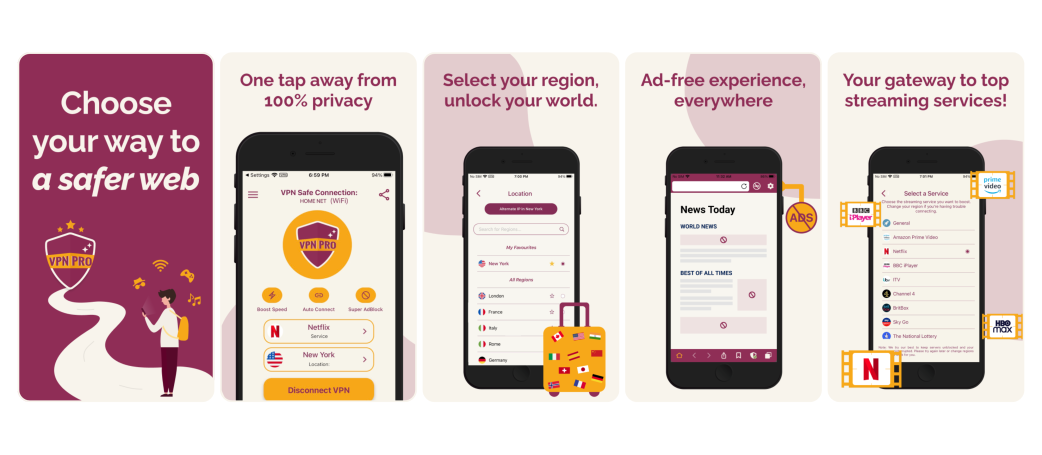
The core of the VPN Pro redesign revolved around three main screens that define the user journey: the Home screen, the Region Selector, and the Service Selector. Each screen was approached with the goal of:
- Simplifying decisions: We wanted to make sure users could make choices quickly without confusion.
- Reducing cognitive load: By keeping the design clean and clear, users could focus on what matters.
- Easy access to important features: Everything users needed, from connecting to changing regions, was always just one or two taps away.
The result? A seamless, straightforward experience that made it easy for users to navigate and control their VPN.
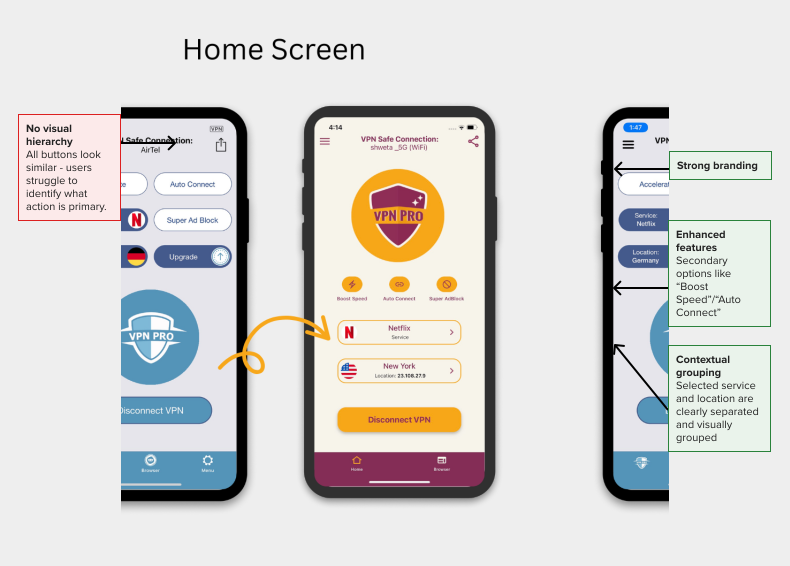
Home Screen
The new design places the Connect/Disconnect button front and center, using color and size to clearly establish hierarchy. The VPN status is now visually represented with a branded shield icon, while selected service and region are highlighted below the logo, offering quick context without tapping into other menus. Icons like "Boost Speed" and "Auto Connect" are now recognisable through visual symbols, reducing the reliance on reading.
Region selector
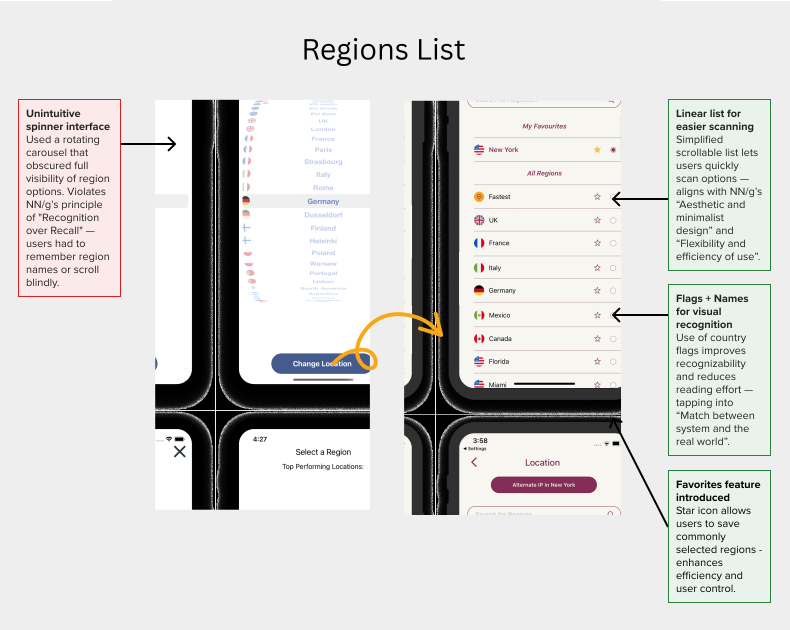
The redesigned region screen presents regions in a scrollable list with country flags, names, and selection indicators. Favorites can be marked for quicker access, and a search bar allows power users to instantly jump to the region they want. Context-aware UI (like "Alternate IP in New York") adds advanced control for users who need it.
In-app browser
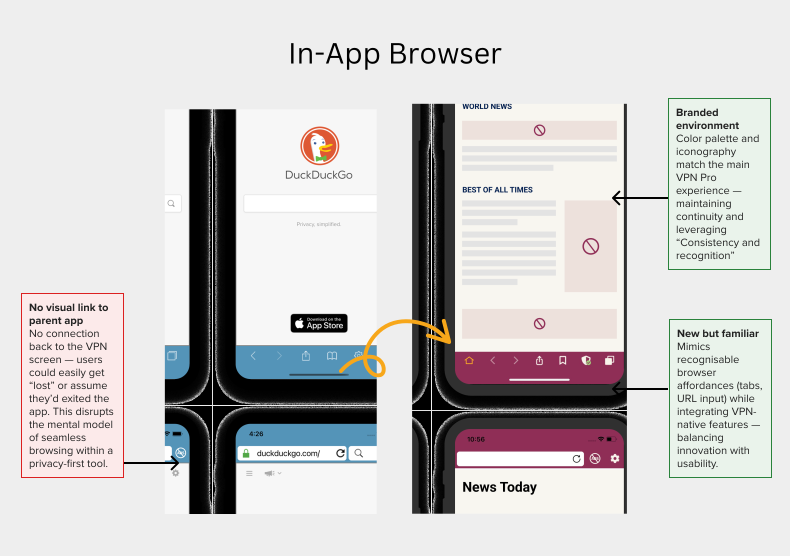
A very important offering in VPN Pro is also the bundled private browser. It lives inside the VPN app, and when activated, presents a completely different user interface compared to the main VPN screen.
It was very important to highlight the two most important, distinguishing features of the private browser in VPN Pro - Ad block & Proxy mode.
I had to also make sure it was very easy to switch back and forth between the browser and the VPN screens while feeling natural. It was also my first time working on a browser, and while not as challenging, was definitely a fun part of the project.
Service selector
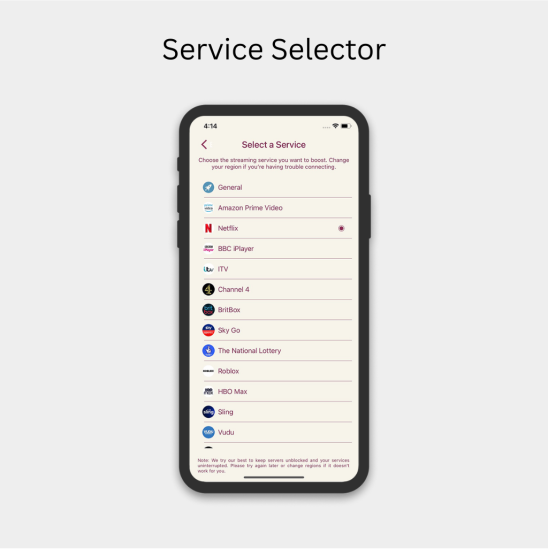
Streaming remains a major use case for VPN Pro. The Service Selector was designed as a task-oriented screen that helps users connect to the right server for platforms like Netflix, Prime Video, or BBC iPlayer.
By listing services with recognizable logos and grouping them under a simple selection model, the screen helps reduce the trial-and-error frustration users often face when trying to access geo-restricted content.
A subtle instructional message at the bottom gives reassurance while nudging users to try alternate regions if something doesn't work - a common edge case in VPN usage.
What did I
learn?
Setting clear expectations: I learned the importance of setting clear expectations from the beginning and maintaining open communication throughout the design process to avoid unnecessary revisions
Power of simple personalisation: Personalization doesn't have to be complicated. Small touches like remembering a user's preferred service or letting them star their favourite regions can make the app feel more tailored to their needs. These small personalisation can go a long way in improving user satisfaction and encouraging long-term use.